
Macintosh graphing, visualization, and modelling / SEM software
Last update 12/10/2023. Also see data extraction, geographic, and miscellaneous software.
Easy to use graphing / graphics / statistics software
PublishPlot
Price: $10
Software updated: 2023
Prior update (version 1): 2014
Current version: 3.1
Listing updated: April 2024
PublishPlot is back! Available in the Mac App Store. It’s designed to quickly make publication-quality plots from tables of data, and was created by a professor and editor.
DataGraph
Version: 5.2
Price: $90 perpetual; $50/year; $30/year academic;
free trial; $120 on Apple Store
Listing updated 4/24/2024. Software updated 9/2023.
Published by: VisualDataTools.com
David Adalsteinsson wrote DataGraph in Cocoa; it grew out of DataTank and shares underlying graphics code, but is limited to two-dimensional graphing. The design is “simple and powerful,” with publication-quality output. DataGraph reads in CricketGraph files; it creates animations and can be called from Automator or the command line.
Newer versions work with R and can handle over 200,000 points.
Kaleidagraph
Configurations: Native M1 support; OS.14 or later; signed; 64-bit
Price: $250 (academic $175); crossgrades $125; upgrades $75
Version: 5
Listing updated: 2/25/2022
Software last updated: 2022
Kaleidagraph does data analysis and graphing; published by Synergy Software. Kaleidagraph can easily tabulate, normalize, and combine data sets, compare theoretical expressions with measured data points, and make publication-quality graphs. While the name dates back to the 1990s, the current version has brand new code.
Reverse graphics: getting data from charts
Engauge Digitizer
Current version: 12.1
Free. Signed. Catalina-ready.
Via GitHub.
Listing updated: 2/25/2022; Mac version updated 11/2019; source updated July 2020
"...converts an image file showing a graph or map, into numbers. The numbers can be read on the screen, and written or copied to a spreadsheet." Can remove gridlines, match points, trace curves, match axes, handle a wide variety of graph types, and has other nifty features. Linux, OS X, and Windows versions; it’s on the Mac App Store.
Engauge Digitizer takes images in PNG, JPG, and TIF format and recovers the data points from graphs, possibly to be used in new graphs. Work can be saved in DIG format for later editing. Engauge Digitizer has numerous special features to make data more accurate and easier to obtain; it’s pretty impressive.
DataThief III
Current version: DataThief III 1.7; Java program
$25 (version 1 was postcard/beerware)
Listing updated 10/3/2021. Software updated 2015.
Unsigned. Runs under Catalina.
DataThief reverse engineers data from a scanned plot, so you can incorporate published data in your plots—handy if you need to compare your data with that of an article that doesn’t provide it in a table.
The current crossplatform version, using Java, can trace most continuous lines, even when they cross themselves, and can convert numbers to other formats (e.g. dates). Version III works on MacOS 8 and 9 as well as X and those other platforms. DataThief II (version 1.21), for older Macs, is still available on the DataThief web site. The original version of DataThief was written by Kees Huyser and Jan van der Laan. Available from Bas Tummers.
Other graphics and visualization
ndCurveMaster
Price: €289
Mac (Sonoma) and Windows • Version 8.6.1.2
Last software update 11/24/2024 • New listing 12-10-2023.
Site: https://www.ndcurvemaster.com
ndCurveMaster is a curve-fitting tools for fitting complex data and finding the best curve line. It automates nonlinear regression equations with an unlimited number of inputs; it can do linear, polynomial, and nonlniear curve fitting. It has heuristic techniques and data analysis (ANOVA, p, collinearity detection) with overfitting and multicollinearity tests. It generates results quickly to Excel or Python. The 2D version is free, able to use a single independent variable.
ImageTank
Public beta 2019-23.
Catalina-and-Big-Sur-safe, and signed.
Software last updated February 2022. Listing updated 12/2/23.
Published by: VisualDataTools.com
ImageTank grew out of DataTank, and is a newer, more modern program currently in public beta. The software loads quickly in Catalina and is clearly Mac-focused; it already has a simple command line utility, though it requires some setup. It can view images and do complex image processing.
PublishPlot
Price: $10
Version: 2.0
Listing updated January 2021. Software updated January 2021.
64-bit. Signed. M1 ready. Big Sur ready.
Published by: RSAC Software
PublishPlot was created to turn any collection of data (in flexible plain-text formats) into publication-quality plots, written by a former journal editor.
The program allows for error bars, annotations (with labels, arrows, and shapes), easy scaling with conserving relative sizes, customizing of any part of the chart, calculation of means, standard deviations, and quartiles (with standard deviation error bars or box-and-whisker graphics), data transformations (including fits and spline interpolations), and simple data editing. All aspects of the plot are sized relative to the plot size itself, rather than with absolute sizes.
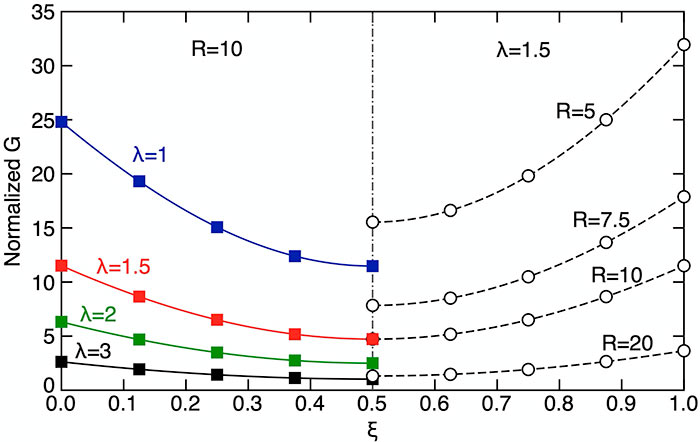
The software is quite surprisingly fast on our Mini 8,1, though the user interface takes some getting used to. Data to be imported has to be saved in tab-delimited format and, ideally, altered in a text editor such as BBEdit or Brackets.
Available from the Mac App Store, and now conforming with all modern standards after a seven-year hiatus.
Thunderplot
Version: 1.15
Listing updated 8/2019. Software updated 2018.
64-bit. Signed.
Published by: Thunderplot
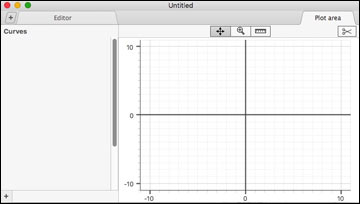
Thunderplot, a native Mac program, was created for quick data visualization; a native Mac program. Its programmer, Vadim Kalinsky, wrote: “It parses contaminated data (like ‘64 bytes from 8.8.8.8’), supports numeric and time axis, expressions, multiple datasets, multiple curves, works quickly with large datasets, has simple and responsive interface, and exports to jpeg/png/etc. It is available in the Apple Store (not currently in the US), and a non-sandboxed (but signed) version is available.”
Our initial impressions are that it is very easy to use, and the snapshot feature should prove very handy to web publishers. The program takes up just 4 MB of space and around 25 MB of RAM, other than data. Despite our poor snapshot, it is capable of sophisticated graphics and has numerous controls.
Lively Logic
Configurations: OS X Mavericks, El Capitan, and Sierra
Price: $20 (Mac App Store)
Version: 1.5.4
Listing updated: 11/2018 (software updated 2018)
From Ripeware, Lively Logic imports data from CSV files to create line graphs, scatter plots, bar graphs, bubble graphs, candlestick charts, pie charts, and tables. It has 75 functions, automatic updating of when data changes, and customization of graph elements. Available in the Mac App Store, it gained axis auto-scaling, better graph panning/scaling by dragging axes, best-fit curves, and support for Retina displays with version 1.1.
MagicPlot
Configurations: Windows, Mac OS X, Linux; 2 MB and does not require installation (Java program)
Student version: Free but limited. Pro: $198, trial available; includes custom fit equations, data and batch processing, vector export, and more.
Version: 2.8
Listing updated: 11/12/2018. Software updated: sometime after Jan. 2017
Appears to be under active development.
MagicPlot is used for scientific and engineering data analysis, graphing, nonlinear curve fitting, and multi-peak fitting. The Pro version program has publication quality customizable plots with multiple axes, text table import with previews, data manipulation, FFT, integration, differentiation, histograms, and other statistics, with multiple undos (some of these features are on the free student version as well).
The software is relatively easy to use and nicely featured, but as a Java program, does not use standard Mac open/close dialogue boxes, so finding files may be hard depending on your file structure. The system is simple enough — fill a table with data, add formulas if desired, choose the type of table you want, and select a large number of options from the dialogue boxes which appear next. It takes a short time to get acquainted but is far easier to learn than many graphing programs; basic statistics are provided. The program can guess the most appropriate fit line, but lets users choose a method if desired.
pro Fit
Configurations: OS X 10.8 or later
Current Version: 7.0.15
Price: $95; upgrade, $55
Software updated: 10/15/2019. Report updated: 3/11/2020
pro Fit is a data analysis and plotting software package from QuantumSoft. Dave [not me] wrote: "...it has an extensive Applescript dictionary, ability to handle large data sets well (I've done graphs with hundreds of thousands of points), can be extended by writing plug ins or adding formulas that you create, does great curve fitting. I consider it much more feature complete than Kaliedagraph and far more intuitive than Igor Pro. They have excellent customer support, usually getting back to you within 24 hours if you have a bug report or feature request." We have observed that ProFit is frequently updated which indicates it is well supported (2010).
“pro Fit is a Macintosh (Mac OS) application for data/function analysis, plotting, and curve fitting. It is used by scientists and engineers to analyze their measurements and the mathematical models they use to describe them. Scientists or students can define any mathematical function and use it to model their data, finding by linear or nonlinear curve fitting the function parameters that best describe their observations. Moreover, they can use a number of tools for the mathematical and statistical analysis of functions and data sets, and they can produce aesthetically pleasing graphical representations for their scientific reports.”
Version 6.1 changes: now Universal Binary; new tool for multidimensional curve fitting; revamped rendering engine for plots with native Core Graphics, PDF, and PostScript support; additions to the scripting language; more. Version 6.2: Python support, extended fitting, more data processing, higher performance.
Powerful omnibus software that takes some getting used to
Graphviz
Configurations: PPC, Universal; current versions from Leopard to Mountain Lion
Current Version: 2.62
Software last updated: 2019
Listing updated: March 2020
Graphviz is an open source drawing package. Prepare for a steep learning curve but it may be worth it if you have graphs you do frequently; not what I'd suggest for the occasional one-off though, especially since it is really designed for Linux and must be installed via MacPorts or Homebrew.
Veusz (“Views”)
Python program for OS X, Linux, UNIX, and Windows
Latest version: 3.2 (listing updated 3/11/2020)
A surprisingly capable free program, Veusz creates publication quality output in PDF or SVG formats. Data can be read from text, CSV, or FITS files, and can be manipulated within the program. There is an object-based interface along with command line and Python-based scripting; it can be used as a Python pltting module. Charts include X-Y (with error bars and such), line and function, contour, image, stepped/histogram, bar, vector field, box, polar, and many others, with broken and multiple axes. There is an API for plugins, the ability to capture external data, and command-line scripting; plotting can also be accessed via DBUS and SAMP.
Nice but pricey
DataDesk / Data Desk DP / Data Desk DDRP
Configurations: started as 680x0; currently Universal; OSX 10.7 or higher
Current Version: 8.21 (OS X), 6.1 (OS 7-9)
Price: $495 normal (DataDesk Pro), academic $295 (Academic Data Desk), $30 student—full versions, no annual fees.
Listing updated: 2/23/2020 • last software update, 2020
Published by DataDescription
An exploratory data analysis package, DataDesk was originally developed by Cornell professor Paul Velleman, once a student of Bell Labs’ famed John Tukey. (800) 573-5121.
The Mac version is at parity with the Windows version. The strength and weakness of DataDesk is its visual environment:
While it implements many traditional statistics techniques suitable for data from planned experiments and sample surveys, Data Desk’s true strength is its powerful tools for data exploration. ... speed and linked views make Data Desk unsurpassable for exploring any set of data. ... Select points in one plot or table and see those points highlight instantly in all other plots. Modify a data value or parameter and see all relevant plots and table update immediately...
Dick Furnas wrote:
DataDesk is superb for exploratory data analysis. A student version is bundled with several textbooks Velleman has been involved in. DataDesk was originally developed for the Mac and makes splendid use of drag and drop, clickable, live interfaces and everything a Mac user might wish for (you can lasso points in a graph and the data values from the underlying data tables will be highlighted, and vice/versa).
Data Desk DDRP was recently added as an upgrade from Data Desk 8, for $39 (for a single license) with upgrades from versions 6 and 7 as well (for $149 and $99, respectively). It includes a data and story library, writes out R or Python commands so any table can be reproduced, and imports from Excel (including relations).
Igor Pro
Price: Several; around $995
Current Version: 8
Listing updated: March 2020
Igor Pro is a charting and data analysis program published by WaveMetrics, Inc. “IGOR Pro is an interactive software environment for experimentation with scientific and engineering data and for the production of publication-quality graphs and page layouts.” IGOR's data files are cross-platform. Analysis includes curve fitting, peak analysis, signal processing, and descriptive statistics. As of version 6, Igor Pro is a Universal Binary, and expanded statistics are available, along with built in FIR and IIR filtering.
JMP
A highly capable data visualization and discovery package which is very speedy and has a friendly Mac-like interface, JMP is covered on the main page.
Stata
Stata, the fine Mac-focused Swiss-army-knife statistics package started including SEM (structural equation modeling) with version 12. Stata details.
Specialty tools
Graphical Analysis
Current version: 4.10
Price: Free!
Software last updated in 2020? Listing updated: 3-11-2020
From Vernier Solutions, Graphical Analysis creates charts and graphs from sensor data (e.g. sensors purchased from Vernier). It lets you “create and print graphs, data tables, text, FFTs, and histograms. Perform automatic curve fits, and add models with adjustable parameters to your graphs. Calculate statistics, tangents, integrals, and interpolations.” It allows collection from Vernier sensors, which is probably why it's free. Data can be shared with Logger Pro and LabQuest 2 or entered manually.
ParallelSets
Java software: Mac OS X (10.5 or later), Linux, Windows
Current version: 2.1
Last updated: 1/2017
ParallelSets provides visualization for categorical data, including surveys and inventory; provides an alternative to simple cross-tabs. Importing is via CSV only, but Excel, SPSS, LibreOffice, and other software allows CSV export. Created by Shree Chhatwal, Shilpa Sharma, Robert Kosara, and Caroline Ziemkiewicz with support of various United States government agencies. Thanks, Chris Lucianu.
GMT - The Generic Mapping Tools
Configurations: UNIX, OS X; since you compile it, Universal
Current version: 5.1.1
Listing updated: January 2017
Last software update: March 2014
A collection of command-line tools that run on all Unix-like systems, including Mac OS X. See gmt.soest.hawaii.edu for details. Many of the main developers (including me) use Mac OS X. (Description by Paul Wessel)
Grapher / Graphing Calculator
Configurations: OS 7-9, PowerPC depending on version
Price: Comes with MacOS
This software was made available free of charge by Apple with the first PowerPC systems to show off the awesome power of the 60 MHz PowerPC 601 chips (which in some ways were quite speedy, but most people probably found themselves wishing for a Quadra). They have continued on, in various forms, through to OS X, and can actually do a number of useful things. Steve Martin of the University of Melbourne suggested its inclusion, noting that the new verison of Grapher allows importing sets of points and includes sample files. This only works for graphing functions.
gnuplot
Configurations: PPC
Current Version: 4.1
Price: free
gnuplot is the Mac version of the open source scientific plotting software. It is available online from many sources.
Magic Maps
Configurations: 10.7 or later
Price: $40 (Mac App Store)
Version: 1.4.12
Listing updated: Jan 2017
Software Updated: Dec 2016
From Evan Miller, Magic Apps is a tool for analyzing time-series data on a map. Maps; states and countries automatically change color to match values, with customization for the colors and numeric ranges (colors can also be set for text fields). Data can be entered manually or via various file formats; built in templates are provided, and KML and ESRI files can be imported. A timeline shows historical averages and totals with a "play" feature to show changes by period. There are mathematical and geographical functions included, with CSV output.
Matplotlib
Free - open source - for Mac OS X
Latest version: 1.3.1
Report updated: July 2014
Matplotlib is a pure python plotting library with the goal of making publication quality plots using a syntax familiar to matlab users. The library uses Numeric for handling large data sets and supports a variety of output backends. The program was originally written by John D. Hunter, who died of cancer in 2012 at the age of 44.
OmniGraphSketcher
Configurations: Universal Binary; up to Snow Leopard; iPad version available
Current version: 3.8.4
Price: Shareware, $80 educational, now open source
Listing updated: January 2017
Software updated: Unknown
An amazingly quick and easy to use program for drawing instant, readable scatterplots and for drawing graphs by hand (without data). Written by Robin Stewart (graphsketcher.com).
Prism
GraphPad’s Prism is an excellent platform for graphing, providing the usability of graphing software with many advanced statistical capabilities. Numerous graph types are available along with flexible regression curving. See our main Mac statistics software page (listed under GraphPad).
R with SEM add-on (free)
R is a general purpose open source statistics package (see the separate page on R for the Mac); there is an SEM (Structural Equation Models) add-on by John Fox.
There is also a PLS package (Adam Naples wrote, “it’s kind of a less constrained, or exploratory SEM”) for R.
SciPy
For Linux and Windows but may be compiled on Macs
Report updated: 1/5/2017
SciPy is a library of scientific tools for Python which supplements the Numeric module. SciPy includes modules for graphics and plotting, optimization, integration, special functions, signal and image processing, genetic algorithms, ODE solvers, and others.
Simgua
Version: 3.4 (for OS X 10.4-10.7) and Windows
Price: download page not working, $860
Report updated: 1/2/2017
Simgua simulates and models complex systems with visual modeling, a Visual Basic compiler for Macs, macros, custom materials, and material transformations.
VTK (Visualization Toolkit)
Pre-compiled only for Windows; may be compiled from source code for OS X
Latest version: 7.1 (listing updated 1/2017)
The Visualization ToolKit (VTK) is a system for 3D computer graphics, image processing, and visualization with several interface layers. In VTK applications can be written directly in C++, Tcl, Java, or Python.
VTK supports a wide variety of visualization algorithms including scalar, vector, tensor, texture, and volumetric methods; and advanced modeling techniques like implicit modelling, polygon reduction, mesh smoothing, cutting, contouring, and Delaunay triangulation. Moreover, we have directly integrated dozens of imaging algorithms into the system so you can mix 2D imaging / 3D graphics algorithms and data. Our goal is to make the software easy enough for any computer literate person to use.
VVI Graph Builder
Configurations: Universal, Snow Leopard and up
Current Version: 10.11
Price: $45 direct, $20 through App Store
Publisher/site: VVI
Lance Bland, the developer, wrote: "In addition to all the standard features, Vvidget includes advanced features such as floating ticks, curves that can extend beyond the graph frame or can be truncated and literally hundreds of tunable parameters. 3D types rotate in real time and even the graph labels can be rotated in their own plane, independent of the main graph rotation. Data can be inserted through a list of numbers or by point and click methods." The same developer provides software such as QuadraticLab for other math functions. The software appears to be under very active development.
In version 10.6, VVidge has a new, improved manual with tutorials; drag-and-drop of graphs to Cocoa projects in the Interface Builder; and other features.
Vvidget and Graph
Configurations: Universal, 32-bit and 64-bit versions; Snow Leopard and up
Current Version: 10.6.3
Price: Free
Publisher/site: VVidget.org
Listing updated Aug 19, 2013
Lance Bland, the developer, wrote: "In addition to all the standard features, Vvidget includes advanced features such as floating ticks, curves that can extend beyond the graph frame or can be truncated and literally hundreds of tunable parameters. 3D types rotate in real time and even the graph labels can be rotated in their own plane, independent of the main graph rotation. Data can be inserted through a list of numbers or by point and click methods." The same developer provides software such as QuadraticLab for other math functions. The software appears to be under very active development.
In version 10.6, VVidge has a new, improved manual with tutorials; drag-and-drop of graphs to Cocoa projects in the Interface Builder; and other features.
Currently, Graph is free but has ads; VVidget is $4 from the Mac App Store and is the same program without ads. Versions are available for free and $2 for iPhone, iPad, and iPod Touch.
Others
Grace is a WYSIWYG 2D plotting tool for the X Window System that runs on “practically any version of Unix-like OS.”
Ctioga is no longer available; use Ctioga2.
Related pages
See our related pages on:
- Regression/ANOVA software;
- General math software;
- Also see data extraction, geographic, and miscellaneous software
Abandoned Mac graphing and data visualization software
See the dead zone.
Sponsored by Toolpack Consulting
Copyright © 2005-2024 Zatz LLC. All rights reserved. Created in 1996 by Dr. Joel West; maintained since 2005 by Dr. David Zatz. Contact us. Terms/Privacy. Books by the MacStats maintainer
